 By Clara WinslowChocolate, confectionery trends, sensory evaluation
Nanga Jackets: Spreadsheet vs Google Sheets Update Times
When facing fall/winter jacket candidates, the part that truly causes errors isn't finding an item that looks suitable—it's being unable to tell whether the information is still valid, whether the fields you recorded have changed, and whether you can quickly return to the original page during later review. This article centers on nanga fall/winter jacket candidates and explains how to combine the fashion-reps website-style Spreadsheet with Google Sheets to complete discovery, filtering, recordin
- Published
- Updated
When facing fall/winter jacket candidates, the part that truly causes errors isn't finding an item that looks suitable—it's being unable to tell whether the information is still valid, whether the fields you recorded have changed, and whether you can quickly return to the original page during later review. This article centers on nanga fall/winter jacket candidates and explains how to combine the fashion-reps website-style Spreadsheet with Google Sheets to complete discovery, filtering, recording, and re-verification.
This task suits people who have already seen several candidates and want to manage them continuously by page update time. It's not for treating a spreadsheet as final proof of price, stock, size, or product authenticity; that information still needs to be confirmed on the accessible product page or QC page. 🧭
What Problem Does This nanga Fall/Winter Jacket Candidate Management Solve
It's recommended to first write the task as an executable action: find nanga jackets that might suit fall/winter wear from fashionreps' product catalog, record the original page and page update time, then decide based on color, size, fit, and layering needs whether to proceed to the next round of verification.
After reading, you should be able to do four things:
Find the category or brand entry the candidate belongs to.
Match each candidate item-by-item with the original product page.
Record update time, review status, and pending fields in Google Sheets.
When opening records next time, distinguish between verifiable, field changed, dead link, and duplicate candidates.
Page update time only indicates that the page record changed or was maintained; it alone doesn't prove that stock, price, size, or product status is currently valid. For highly volatile fields, re-open the original page during review and record the new verification date.
Checking the fashionreps Website-Style Spreadsheet's Categories, Brand Entries, Images, and Links
The provided fashion-reps page shows that the site uses product catalog, brand entries, blog, author columns, and category browsing as primary discovery methods. Product pages can lead to QC image areas, and the page displays visible fields like product name, number of source styles, and SKU. The site also offers shopping agent selection entry and clearly indicates that purchase, payment, and logistics are handled by the chosen agent's website.
This means fashionreps' website-style Spreadsheet is better for first-round discovery: enter candidate collections by category or brand, open product cards, then check images and original product pages. It is not an order management sheet that can replace the shopping agent's backend, nor should QC images on the page be interpreted as proof of current stock.

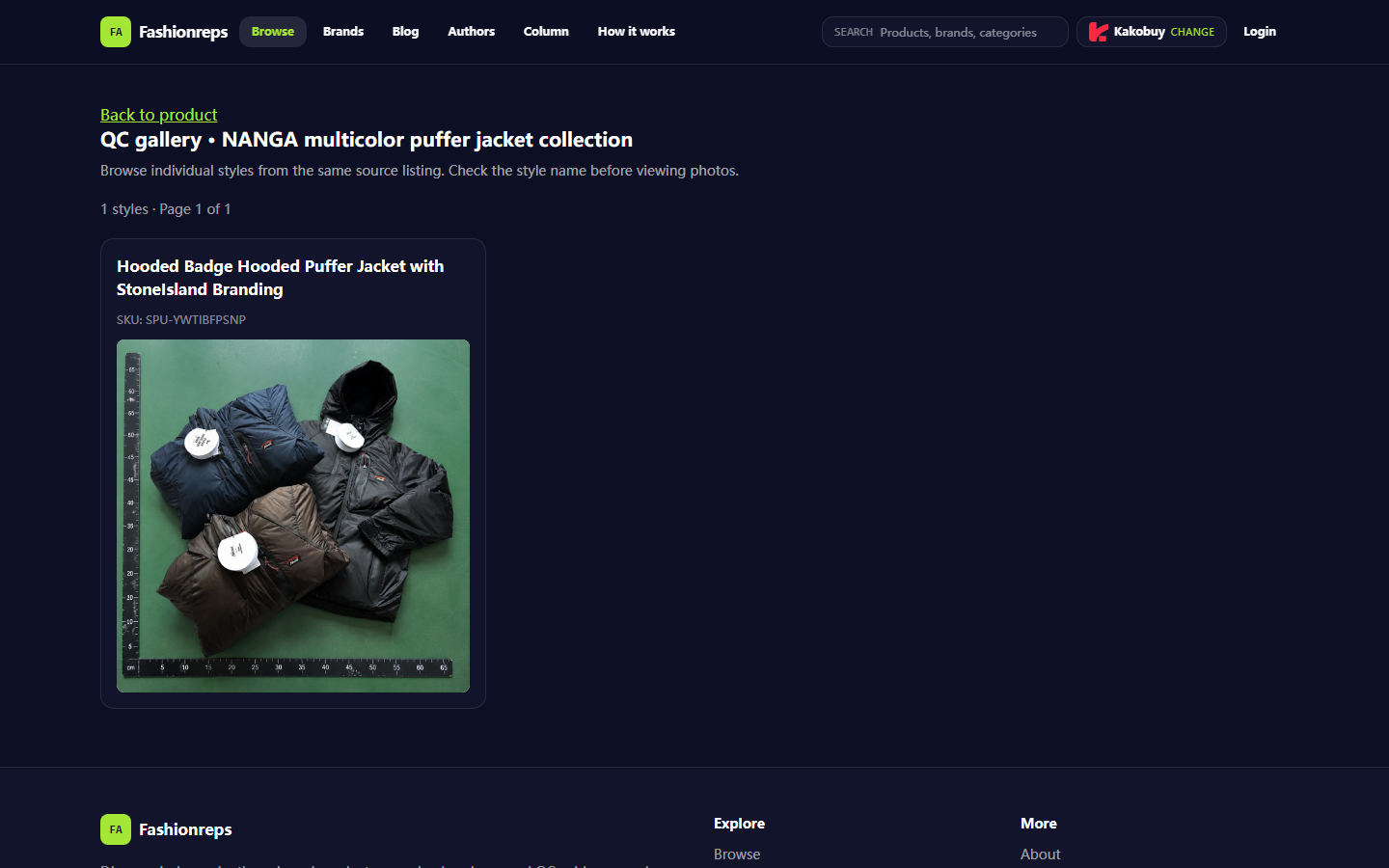
The image corresponds to the NANGA multicolor puffer jacket collection QC page on fashion-reps. The page shows that the collection contains one viewable style and prompts viewers to first check the style name before looking at photos. This information is suitable for confirming the relationship between a candidate and a QC page, but not enough to infer that other colors, sizes, or versions are still purchasable.
When browsing, check in order:
Does the product name clearly include nanga or a corresponding style identifier?
Does the product card open a valid detail page, not a blank category page?
Does the QC area correspond to the current candidate's name or SKU?
Are the images the whole collection, a single style, or a summary of multiple styles?
Does the page show an update time or other maintenance information useful for review?
Is the shopping agent entry on the page just a redirect selection, with the actual order still needing to be completed on the agent's website?
Don't list a candidate as suitable just because the image looks like a fall/winter style. Images help confirm appearance and style association, but color, size, fill, fabric, fit, and purchase availability still need to be verified item by item. 🧥
Setting Up Page Update Time and Review Status Fields in Google Sheets
The value of Google Sheets lies in turning scattered candidates into maintainable records. You don't need many fields, but they must answer three questions: Where did I see it? When did I last check it? What is still missing for the next step?
Recommended fields:
| Field | Recording Method | Purpose |
|---|---|---|
| Candidate Name | Use the name visible on the page | Avoid renaming by impression |
| Page URL | Save the original product page or QC page address | For easy return |
| Page Update Time | Record as shown on the page; if not shown, write "Not provided" | To judge whether re-verification is needed |
| Current Verification Date | Write the actual date you opened and checked the page | Distinguish page time from your own check time |
| Color | Use the page's original text or mark "Pending confirmation" | Support appearance filtering |
| Size | Record visible size info or "Pending confirmation" | Support fit judgment |
| Fit | e.g., cropped, loose, or unknown, but must have page basis | Support layering judgment |
| QC Image Status | Present, absent, partially matching, pending confirmation | Check whether images support the current candidate |
| Link Status | Accessible, redirected, dead, pending review | Prevent continuing to use old pages |
| Review Status | Initial screening, pending verification, verified, excluded, duplicate | Manage next action |
| Reason for Exclusion or Pending Confirmation | Briefly explain missing fields | Avoid repeated checks |
If the page doesn't clearly show an update time, don't guess. Record "Page Update Time" as "Not provided" and separately fill in "Current Verification Date". This way you won't mistake your own visit date for the website's update time.
Statuses in the sheet should remain limited and mutually exclusive:
Initial screening: only discovery completed, no item-by-item check yet.
Pending verification: candidate worth continuing to look at, but still missing key information.
Verified: link, name, and currently needed fields have completed this round of checking.
Field changed: page still accessible, but name, images, size, or other information has changed.
Dead: page cannot be accessed normally, or no longer provides sufficient information.
Duplicate: points to the same product or same source style as another record.
Excluded: does not meet color, size, fit, or usage scenario requirements.
Using filters to sort by "Review Status" and "Page Update Time" is more practical than sorting by product name. Prioritize opening records that haven't been reviewed in a long time, whose page information has changed, or whose status is pending confirmation. 📅
Filtering Candidates by Color, Size, Fit, and Fall/Winter Layering Needs
Filtering should start from the wearing task, not just from the brand name. Fall/winter jackets usually need to be combined with inner layers, knitwear, or other warm layers, so fit and available space matter more than appearance alone.
Judge in this order:
Does the color suit existing clothing, and do you need a low-key or high-contrast match?
Does the page provide the target size, and is the size chart clear?
Does the fit have enough room for fall/winter inner layers?
Do the images help confirm length, hood shape, pockets, or obvious structure?
Which key fields are still missing, and is it worth proceeding to the next round of verification?
If the page doesn't clearly state the fit, don't write "loose", "slim", or "suitable for layering" as a confirmed conclusion. Record it as "Fit pending confirmation" and note that a size chart, flat measurements, or more angle images are needed.
Also don't equate "has QC images" with "quality verified". QC images provide observable evidence; they help check page-style correspondence but cannot replace verification of size, material, warmth, stock, and after-sales terms.
Matching Website Product Cards with Spreadsheet Records Item by Item
After initial screening, treat the website page as the source and Google Sheets as the working record. At minimum, cross-check the following between the two:
Are the names consistent, or is it just a series name vs a specific style name?
Are the SKU or style identifiers consistent?
Do the product page, QC page, and images point to the same style?
Are page update time and current verification date recorded separately?
Do the color, size, and fit in the sheet all have a basis on the page?
Does the sheet preserve "Pending confirmation" instead of filling blanks with guesses?
The simplest method is row-by-row review: open the original page, check the name and link, view images or QC area, then update the sheet status. Don't copy a large chunk of page text into the sheet; keeping enough identifying information and the reason for pending confirmation is sufficient. This makes maintenance easier and reduces the risk of being unable to judge when fields become outdated.
How to Mark Dead Links, Field Changes, and Duplicate Candidates
When a link is dead, don't delete the record immediately. Change the status to "Dead", keep the original URL, last verification date, and failure symptom, such as page won't open, redirects to an unrelated page, page is empty, or only category info remains. This avoids searching for the same candidate again and helps determine if a new page appears.
If the link still opens but the name, images, or SKU have changed, use "Field changed" and note where the change occurred in the remarks. The changed page might be an updated record of the same item or might now correspond to a different style; don't merge based solely on similar titles.
When finding duplicate candidates, first compare page URLs, SKUs, product names, and QC image correspondence. Only merge when evidence is sufficient; if one is a collection page and the other a single style page, keep both page roles and mark the relationship in the sheet. Don't assume they are identical just because images are similar.
Applicability Boundaries for Website Browsing and Long-term Sheet Maintenance
The fashion-reps website-style Spreadsheet is suitable for quickly discovering candidates, browsing category entries, viewing product cards, and entering QC pages. Its advantage is putting product information, brand or category entries, and observable images in a continuous browsing path.
Google Sheets is suitable for long-term maintenance, multi-person collaboration, field filtering, and status tracking. It explicitly preserves statuses like "Pending verification", "Field changed", "Dead", and "Duplicate", but it does not automatically ensure real-time accuracy, nor does it judge whether a product is suitable for ordering.
When combining the two, follow this boundary: the website is for discovery and revisiting; the sheet is for recording and scheduling next steps. When a page changes, the currently visible information obtained by reopening the page takes precedence, and the verification date should be updated; don't just change a price, size, or status in the sheet without leaving a basis.
Which Content Can Only Be Listed as Pending Confirmation When Page Information Is Insufficient
The following should remain pending confirmation when there is no clear evidence on the page:
Current stock and orderability.
Specific fill material, weight, and warmth rating.
Fabric composition, hand feel, and durability.
Whether sizing runs large, small, or is suitable for layering.
Destination country shipping costs, taxes, customs requirements, and final landed cost.
Return/exchange conditions, after-sales responsibility, and the actual handling method of the shopping agent.
Whether images are from the current style, current batch, or the same seller.
The shopping agent selection entry on the page does not mean the platform has made the purchase for you. Orders, payments, and logistics should be confirmed on the actual chosen agent's website; destination country taxes, import restrictions, and customs documentation also need to be checked separately based on the delivery address and order terms. Do not handle compliance issues by under-declaring, splitting orders, or evading inspection.
Checklist Before Moving nanga Fall/Winter Jackets to the Next Verification Step
Before passing a candidate to the next step of size, price, or purchase verification, check item by item:
Product name is clear and truly related to nanga fall/winter jacket candidates.
Original product page or QC page can be accessed normally.
Page link is saved and not just pointing to a generic category page.
Images correspond to the candidate name or style identifier.
Page update time and current verification date are not mixed up.
Color, size, and fit are not filled in with guesses.
If layering is needed, fit basis is recorded; parts without basis are marked pending confirmation.
Duplicates, field changes, and dead links have clear statuses.
Price, stock, shipping, taxes, after-sales, and customs information are not mistakenly written as guarantees.
Next action is clear, such as checking the size chart, reopening the link, or verifying agent conditions.
The savings from this management method don't necessarily show up as immediately lower product prices, but as reduced repeated searching, repeated verification, and wrong decisions caused by old links. The cost is needing to maintain dates, statuses, and notes, and bearing the risk of sheet information lag. It suits people with multiple candidates, needing repeated comparison, or wanting to collaborate; if there is only one item and you only plan to check it immediately, building a full sheet may add unnecessary record-keeping cost. Any candidate with key fields still missing, style unverifiable from the page, or agent and destination country conditions unverified is not recommended to proceed directly to the ordering stage.
Review Boundary
This article only explains candidate management methods based on currently visible information on the provided fashion-reps page. Page information, link status, product fields, shopping agent entries, and destination country fees may change; when handling candidates again, reopen the source page and record a new verification date.